GLCDprocDriver
is
the glue between the graphlcd-base
library from the GraphLCD
project, which is written in C++, and LCDproc's
meta-driver glcdlib,
which
extends supported displays in LCDproc by those supported through
graphlcd-base (just in text mode, of course). GLCDprocDriver
is
actually implemented in C++, but provides the necessary wrapper C
calls for use by LCDproc's
glcdlib
driver. GLCDprocDriver
is
NOT intended to provide general C wrapping for the whole
graphlcd-base
library, as it really only implements the actual meta-driver for
LCDproc.
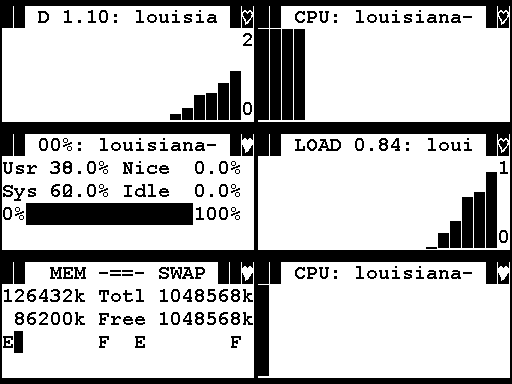
The image above shows a 21x5 lcdproc client
rendered on the graphlcd-base's image
driver (FYI, this one creates PBM images in /tmp), which was
configured at
256x128
pixel in /etc/graphlcd.conf.
Installation
On
non-Gentoo
systems:
Get a fresh graphlcd-base,
and
optionally graphlcd-media
(for
fonts to play with), from
the GraphLCD
project. If you get version 0.1.6, make sure to apply these patches:
If you want to actually use FreeType2(recommended, if it's not too
much trouble to have
it installed), you should of course
install it first, if not, comment HAVE_FREETYPE2
in Make.config.
Compile &
install
graphlcd-base.
Adjust the section for the driver(s) you want to use in /etc/graphlcd.conf
after
copying it there, according to your needs.
From the downloads
section below, get
the GLCDprocDriver,
compile & install.
Get LCDproc-0.5.3 or a fresh LCDproc CVS checkout, or a LCDproc nightly tarball and configure it for the glcdlib
driver,
build & install as you normally would. Watch the output of the
configure script, it will print a message if the glcdprocdriver
headers or the library itself aren't detected, and LCDproc wouldn't be
built with the glcdlib
driver.
Configure
/etc/LCDd.conf:
for use with glcdlib;
choose the graphlcd-base
supported driver you want to use;
provide a full path to a TTF font you would like to use, or
a
*.fnt font taken from the graphlcd-media
archive;
try different LCDproc sizes (in characters), minimum cell
sizes
and fonts to suit your actual display's pixel size and to get
optimal results.
As of 2006.10.08, the ebuild for glcdprocdriver
is in the official portage tree, you should follow the instructions
seen when emerging lcdproc. If the latest version is not yet available,
you can download the ebuild from this site, along with the one for GraphLCD-base if portage does not yet provide a newer one.
After that, proceed with the configuration according to the non-gentoo instructions.
If you don't see the heartbeat on your display (because
it's
covered by an ICON_BLOCK_FILLED), try this patch (Gentoo users: copy the lcdproc ebuild over to your overlay and manually add this patch yourself in the ebuild).
However, this might very well
be just a workaround in LCDproc for a bug in the glcdlib driver or
in the GLCDprocDriver wrapper only, I still need to sort this out
with help from the core LCDproc developers.
Credits
Many thanks to Joris Robijn, Peter Marschall, David Glaude, Rene
Wagner, Volker Boerchers from the LCDproc
team, Gustavo Barbieri from the Freevo
team, Robert Buchholz and Markus Ullmann for getting the ebuilds into the official Gentoo portage tree and last but
certainly
not least Andreas Regel from GraphLCD.